
Overview #
Reviport uses cookies and similar technologies to operate the service.
Cookies are used for:
- Essential features (such as authentication and keeping you logged in)
- Security and abuse prevention
- Preferences and consent settings
- Optional analytics, where required and only with your consent
Essential cookies are required for the service to function properly. Blocking them may prevent parts of the website or web app from working.
How to manage cookies #
You can manage your cookie preferences at any time using the CookieYes preference center.
Website:
- Click the cookie icon (bottom-right corner).
- Adjust your consent settings.

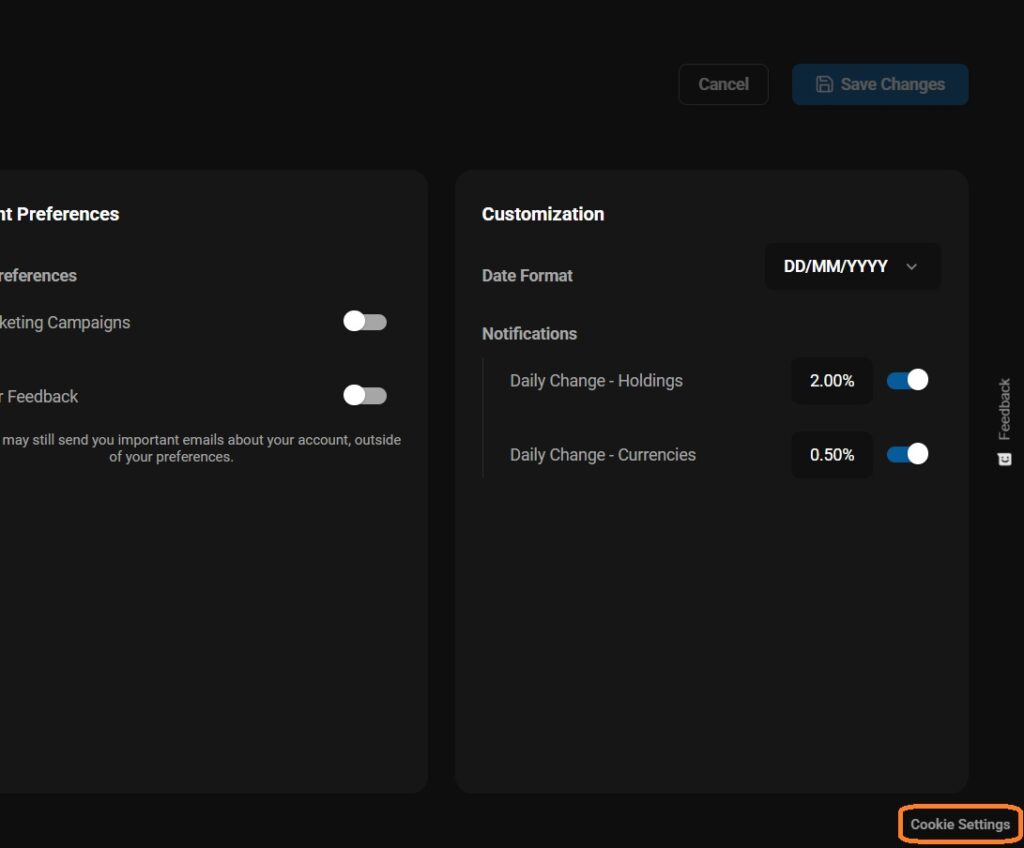
In-App (Desktop):
- Go to Settings.
- Click “Cookie Settings” (bottom-right).
- Adjust your consent settings.
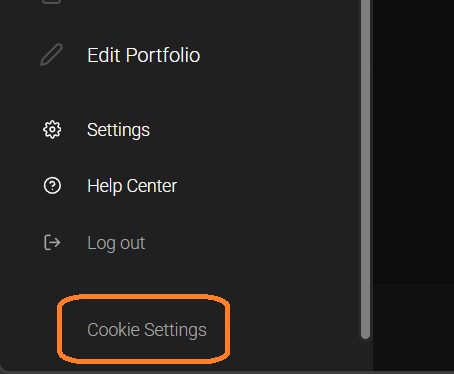
In-App (Mobile):
- Open the menu.
- Click “Cookie Settings” (bottom-left).
- Adjust your consent settings.
You can also manage cookies through your browser settings. Note that blocking essential cookies may prevent parts of the service from working correctly.
Analytics note (Hotjar) #
Reviport uses Hotjar for analytics and feedback tools. Hotjar is loaded only when analytics consent is granted.
If you withdraw analytics consent, analytics tracking will no longer load moving forward.
Learn more #
For more detail about cookies and data processing, see the full Privacy Policy.
