
Overview #
Reviport subscriptions are processed through Paddle, our payment provider and merchant of record.
Paddle:
- Processes subscription payments
- Issues invoices and receipts
- May calculate and collect applicable taxes (such as VAT or sales tax) based on your billing details and location
- May display prices in your local currency where supported
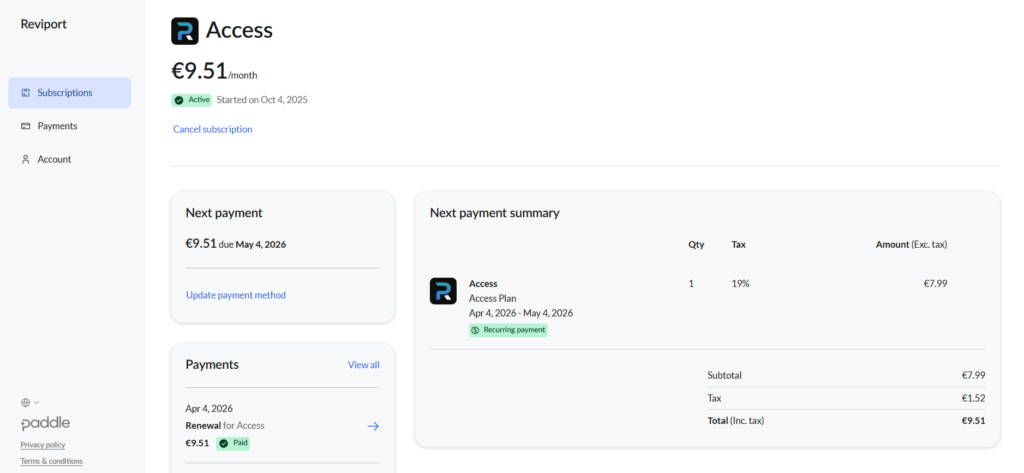
All subscription management (cancellation, invoices, billing details, payment method) is handled through the Paddle customer portal.
How to access the billing portal #
- Go to https://reviport.com/plan
- You will be redirected to the Paddle customer portal.
- Log in using your subscription email (if prompted).
What you can do in the billing portal #
In the Paddle portal you can:
- View and download invoices and receipts
- Update your payment method
- Update your billing details
- Review subscription status
- Cancel your subscription
Cancel your subscription #
You can cancel your subscription at any time.
Steps
- Open the billing portal at https://reviport.com/plan
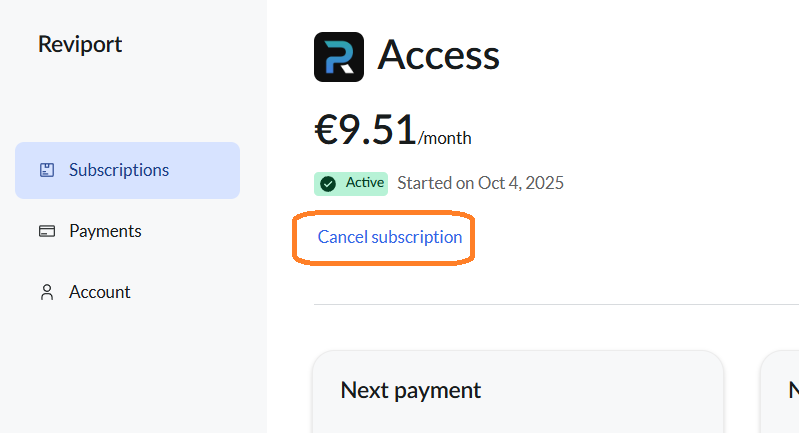
- Select Cancel subscription
- Follow the instructions provided by Paddle
- Confirm the cancellation
What happens after cancellation? #
- Your subscription stays active until the end of the current billing period (unless Paddle states otherwise during the cancellation flow).
- You will not be charged for the next billing cycle.
- Access to the web app ends when the current billing period expires.
- You can resubscribe at any time to regain access.
Taxes and currency #
Tax handling (such as VAT or sales tax) is determined at checkout based on your billing details and location. Paddle may calculate and collect applicable taxes and may display pricing in your local currency where supported.
Important notes #
- Subscription changes and cancellations must be completed through the Paddle billing portal.
- Deleting your account does not automatically cancel your subscription.
- If you experience issues accessing the billing portal, contact us before your renewal date.
